

BYOD (Bring Your Own Device) may allow for flexibility, ease of use and mobility when it comes to employee productivity, but there are still serious security and compliance concerns to be taken into account. CIO-Today.com reports on the simplest but often-overlooked security measures that can be taken to prevent a data breach.
BYOD (Bring Your Own Device) may allow for flexibility, ease of use and mobility when it comes to employee productivity, but there are still serious security and compliance concerns to be taken into account. CIO-Today.com reports on the simplest but often-overlooked security measures that can be taken to prevent a data breach.
While different industry compliance standards, such as HIPAA or PCI, may require more stringent data security technology, the average mobile device user can take their first steps toward a more protected environment by first enabling remote wipe on their devices.
CIO-Today.com reports that only 55 percent of mobile users have remote wipe enabled on their smartphones. Remote wipe is offered by default or as an application on many different types of mobile devices that you can install and configure to meet your needs. In the case of a lost or stolen device, remote wipe allows you to log into an interface, click on a button and have the option to permanently delete all data and settings currently on your device.
This is key to remediation in the event of a data breach – limiting the scope of risk should be part of an incident response plan’s processes. By having the capability to remotely delete data off of a lost or stolen device, you can significantly reduce the chances of data misuse.
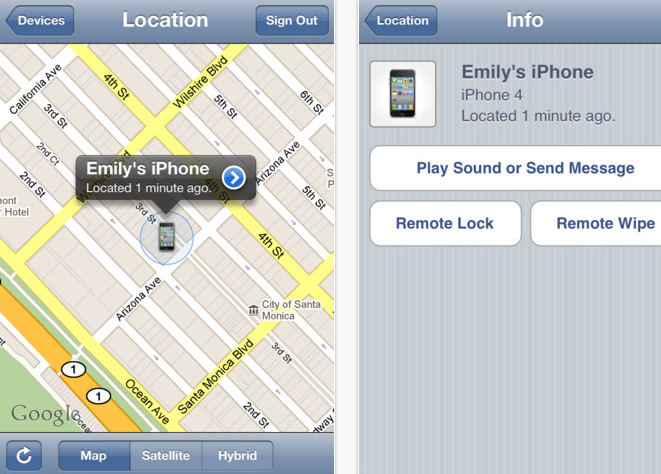
Find My iPhone
Additionally, if you are using an iPhone, you can enable Find my iPhone; an app that will attempt to locate your lost or stolen iPhone and pinpoint the location on a map. You can choose to send a message or activate a sound to help locate or draw attention to your device.
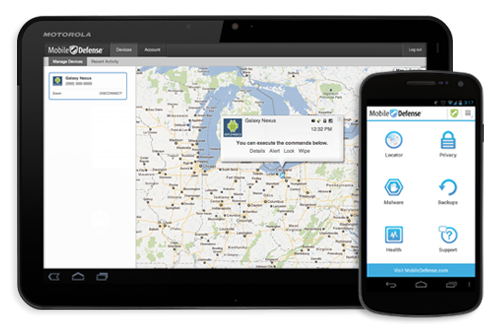
Mobile Defense App
For Android phones, third-party apps can be used for remote wipe, such as the free Mobile Defense app. This app can also locate your device with the exact address displayed on an embedded interactive map. Mobile Defense will also email you if someone tries to swap out your SIM card as part of their security measures.
While remote wipe and device locators can be ideal after a device is lost or stolen, another way to prevent a potential data breach is to secure the data in a protected network/environment, not only on a device. In a blog post I wrote in May, Keep ePHI on Secure Networks, Not Mobile Devices, Recommends OCR, two-thirds of large healthcare breach cases involved loss or theft, and one-third involved electronics. Sixty-three thousand individuals were affected by the theft of stolen mobile devices.
Instead of losing the sole copy of your data when you lose your phone or laptop, consider keeping critical data and applications safe in a protected data center with all of the proper physical, network and administrative security in place. That way, you can recover and access important data and it isn’t dependent on access to one device. Read more about secure data centers.
Recommended Reading:
Bring Your Own Device (BYOD) with Virtualization
Simple Security Improvements with Your Mobile Device
BYOD: Mobile Healthcare Policies
References:
BYOD Trend Opens Companies to Security Breaches
Mobile Defense App
Find My iPhone App